
Category: Articles
20 Best Finance Software for Small Businesses in 2025
TABLE OF CONTENT :
Managing money is one of the biggest jobs for any small business owner. You need to track spending, send bills, and pay your team. Doing all of this manually takes time and can lead to mistakes.
The right finance software can help you work faster, stay organized, and keep your business running smoothly.
In this guide, we’ll explain what finance software is, why it’s useful, and share 20 of the best finance software options for businesses in 2025.
What is Finance Software?
Finance software is a tool that assists businesses in managing their money easily. It does many tasks automatically, such as keeping track of income and expenses, making budgets, sending invoices, tracking spending, handling payroll, preparing taxes, and creating financial reports. Many finance software programs are cloud-based, so you can use them anytime and anywhere. They save time, reduce errors, and give a clear view of your finances to help you make better decisions.
Benefits of Using Finance Software in Small Businesses
Here are the main advantages that trusted finance software gives to small businesses, based on facts and expert advice.
Saves Time and Boosts Operational Efficiency
A study by Deloitte shows that small business owners spend about 120 hours a year on accounting work. Finance and accounting software automates jobs like sending bills, tracking expenses, and paying staff, saving a lot of time. For example, QuickBooks says its users save up to 40% of their accounting time by using their software, which lets owners focus on growing their business.
Improves Accuracy and Reduces Human Error
The American Institute of CPAs found that almost 40% of small business financial records have errors when done manually. Trusted financial planning software stops many of these errors by doing calculations automatically and checking data, making sure your records are correct and follow the rules.
Shows Real-Time Financial Reports
In 2025, having up-to-date money information is very important. Cloud-based finance & accounting software shows live dashboards and reports that help owners see cash flow, unpaid bills, and expenses right away. This helps make better decisions faster and manage money in a smart way.
Makes Tax Filing and Following Rules Easier
Tax rules change a lot and can be hard to follow. Finance software organizes all your income and expenses clearly and creates reports ready for tax filing. The IRS says using organized accounting and financial management software lowers the chance of tax problems and helps you file taxes correctly, so that you can avoid fines.
Helps Manage Cash Flow and Track Payments
Keeping cash flowing is very important for small businesses. Financial planning and reporting software monitors your bills and payments, and sends reminders to customers and alerts for bills you owe. This helps get money in on time and pay bills on schedule. A U.S. Bank study says bad cash flow is why 82% of small businesses fail.
Helps with Budgeting, Forecasting, and Planning
Planning money ahead is easier with financial manager software because it looks at past data to estimate future income and expenses. The Small Business Administration (SBA) says businesses that budget well are 30% more likely to last over five years. These tools help owners make good decisions, spend wisely, and find chances to grow.
Affordable and Can Grow with Your Business
Hiring full-time accountants can be expensive. Finance manager software is a cheaper choice with monthly plans that fit small business budgets. Programs like Xero and FreshBooks let businesses start simple and add more features like extra users or detailed reports as they grow. This makes it a smart money choice.
Better Teamwork and Strong Data Safety
Cloud finance software lets accountants, bookkeepers, and partners access your financial data safely from anywhere. This makes communication easier, and everyone stays up to date. Also, top-rated financial software companies follow strict rules to keep your data safe from hackers.
List of 20 Best Finance Software
- TechForing Cent
- QuickBooks Online
- Xero
- FreshBooks
- Wave Accounting
- Zoho Books
- Sage Business Cloud Accounting
- Kashoo
- FreeAgent
- QuickFile
- NetSuite ERP
- MYOB
- Odoo Accounting
- ZipBooks
- Brightbook
- SlickPie
- GnuCash
- Sunrise by Lendio
- AccountEdge Pro
- Tipalti
Now, we will share each software’s key features, pros, cons, and pricing to help you find the right tools for your business or startup.
1. TechForing Cent - Best Software for Finance Management
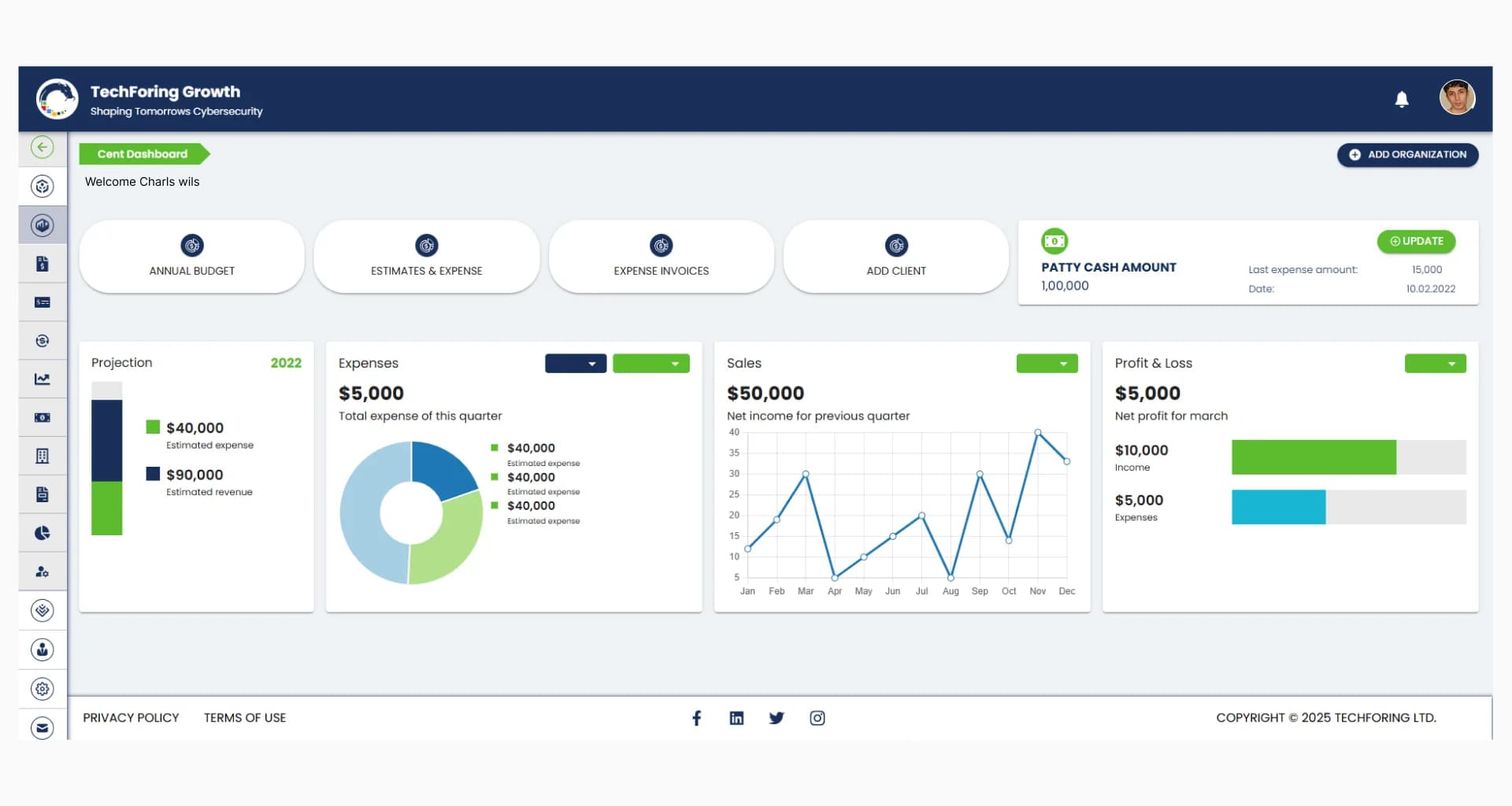
TechForing Cent is a smart financial planning and analysis software that handles budgeting, cash flow, payroll, and financial reports easily. By bringing all financial data together and automating important processes, TechForing Cent helps businesses make better decisions and work more efficiently. Its easy-to-use design works well for startups and growing companies, giving real-time information that supports smart planning. It also includes tools that help predict budgets and create custom reports, which help businesses plan for the future and follow financial rules.
Key Features
- Budget Management
- Sales Management
- Cash Flow Management
- Estimates & Expenses
- Payroll
- Asset Management
- Tax Management
- Financial Reporting
Pros
- Easy budgeting and forecasting for projects
- Automated sales tracking and invoicing
- Clear cash flow monitoring with less manual work
- Accurate payroll processing with multi-currency support
- Asset and tax management made simple
Pricing Plans
-
From $99 - $249
Best Suited For
- Small to Medium-Sized Enterprises (SMEs)
- Growing Businesses
- Startups
- Financial Teams & Controllers
- Companies with Multi-Department Operations
- Businesses Operating in Multiple Currencies
2. QuickBooks Online - Best Finance Software for Business
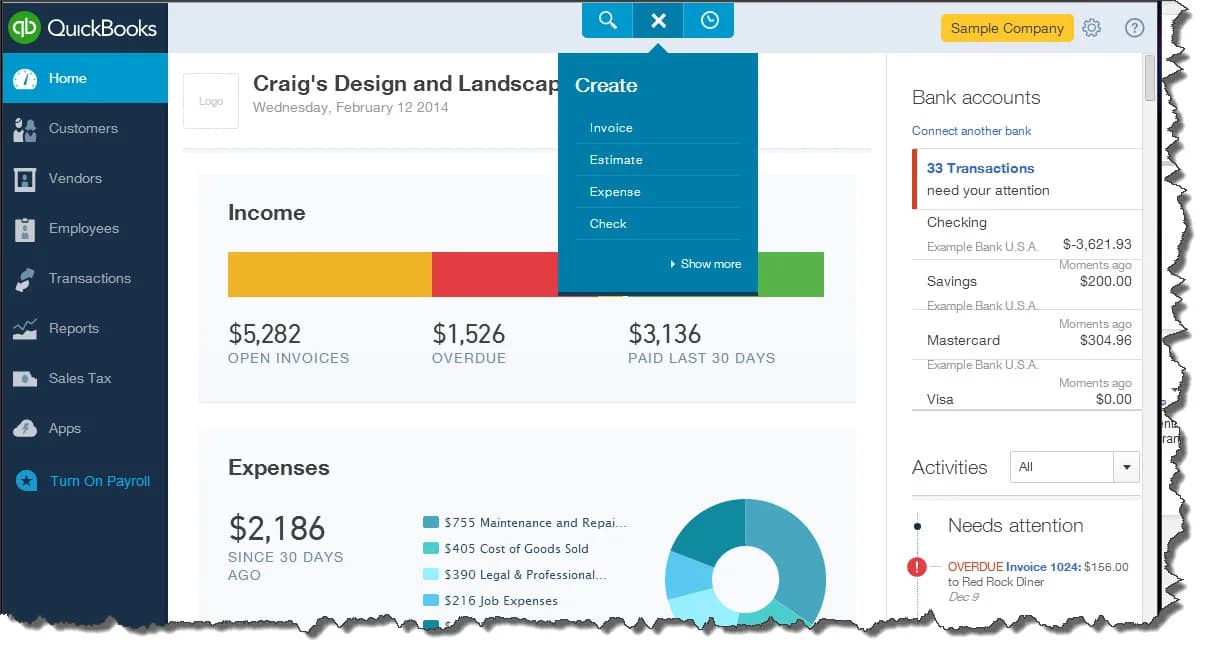
QuickBooks Online is a famous cloud-based accounting software that manages finances, such as bookkeeping, invoicing, payroll, expense tracking, and tax preparation, that you can access safely from any device with internet. QuickBooks Online is easy to use, even if you don’t have accounting experience. However, it has strong features like support for multiple currencies and the ability to connect with hundreds of other apps, such as payment services and online stores. The software updates regularly to follow the latest tax rules and accounting standards so that businesses can stay on the right side of the law.
Key Features
- Invoice & Estimate Management
- Expense Tracking & Receipt Capture
- Bank & Credit Card Integration
- Multi-Currency Support
- Inventory Management
- Real-Time Financial Reporting
- Payroll Management
- Tax Preparation & Filing
- Customizable Dashboards
- Client Collaboration
Pros
- Easy to navigate, even if you’re not an accountant.
- Cloud-based, so you can manage finances on any device with internet.
- Connects with over 650 other apps, like payment processors and CRM tools.
Cons
- Premium plans can be costly for small businesses.
- Entry-level subscriptions don’t include all features, like inventory tracking.
Pricing Plans
-
From $17 - $117
Best Suited For
- Small to Medium-Sized Businesses
- Freelancers and Contractors
- Retail and E-Commerce
- Service Providers
3. Xero - Best Accounting Software for Financial Services
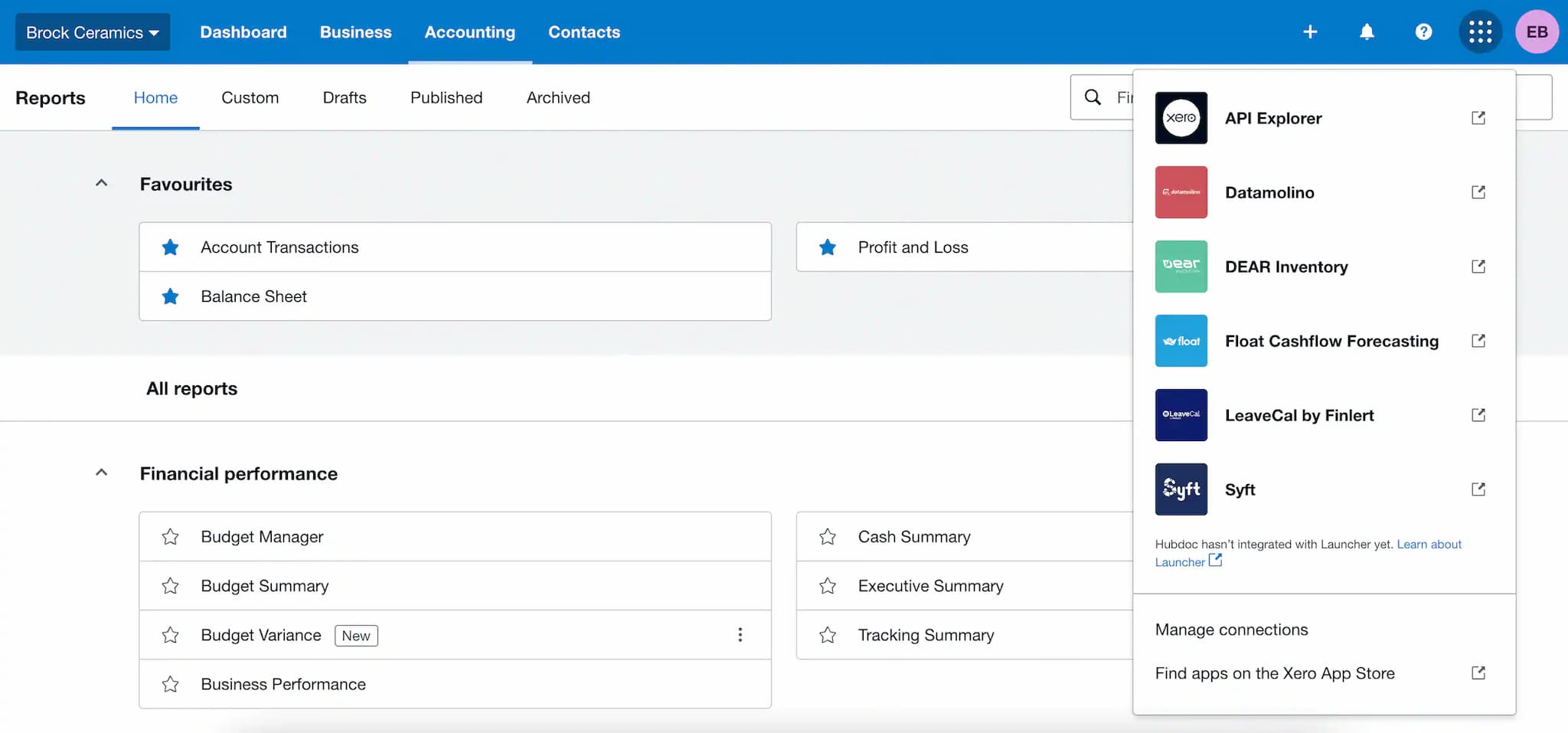
Xero is a cloud-based financial management and accounting software made to make money management easier for small and medium-sized businesses. It has a simple and easy-to-use design, connects your bank accounts in real time, and works with over 800 other apps. You can handle invoices, expenses, payroll, inventory, and reports from anywhere on any device. Xero updates often to keep up with tax rules and has a good mobile app, so it’s a great choice for businesses that want to handle their money easily.
Key Features
- Bank Connections & Reconciliation
- Invoicing & Quotes
- Expense Management & Receipt Capture
- Payroll Processing
- Inventory Management
- Financial Reporting & Dashboards
- Purchase Orders & Bills
- Multi-Currency Support (Established plan)
- Project Tracking & Time Billing (Established plan)
- Mobile App Access
- App Integrations via Xero App Store
Pros
- Intuitive and user-friendly interface
- Unlimited user access on all plans
- Integration with over 800 third-party apps
Cons
- No phone support; help is online or by email
- Basic plan limits the number of invoices and bills
Pricing Plans
-
From $20 - $80
Best Suited For
- Small & Medium-Sized Businesses
- Freelancers and Contractors
- Retail and E-Commerce Businesses
- Service Providers and Consultants
- Accountants and Bookkeepers
4. FreshBooks - Best Financial Software for Firms

FreshBooks is an easy-to-use cloud accounting software that helps simplify money management with features like customizable and automatic invoicing that let you accept payments online quickly. You can easily track expenses using your phone and connect your bank account to keep everything up to date. FreshBooks also gives you real-time financial reports, including profit and loss and tax summaries. Payroll is simple with help from Gusto, and you can share your financial info easily with your accountant. You can use FreshBooks on your phone with apps for iOS and Android since it’s cloud-based, giving you the freedom to work anywhere.
Key Features
- Customizable Invoices
- Recurring Billing
- Checkout Links
- Receipt Scanning
- Bank Integrations
- Double-Entry Accounting
- Billable Hours Tracking
- Project Tracking & Collaboration
- Tax-Time Reports
- General Ledger
- Audit Log
- Client Portal
- Team Collaboration
- Integration with 100+ Business Apps
Pros
- Easy-to-use interface, great for non-accountants
- Built-in time and expense tracking
- Responsive and helpful customer support
Cons
- Limited features in the basic plan
- Needs reliable internet to work properly
Pricing Plans
- 30-day free trial available for new users
- From $2.10 - $6.50
Best Suited For
- Freelancers and Solopreneurs
- Trades and Home Services
- Marketing and Creative Agencies
- IT and Development
- Legal and Consulting Services
- Health and Wellness
- Education
- Businesses with Employees or Contractors
- Retail Businesses
5. Wave Accounting - Top Financial Management Platform
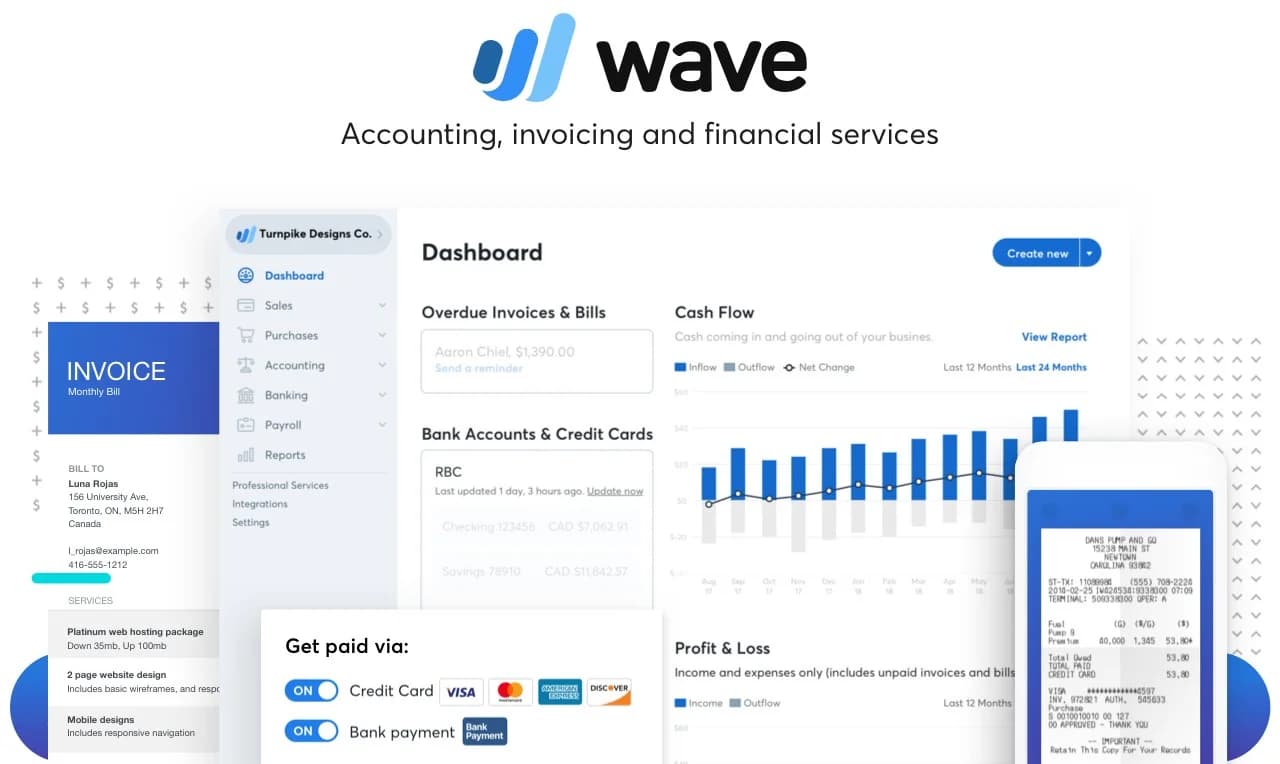
Wave Accounting is a cloud-based financial management software that allows you to track income, expenses, and cash flow, and create financial reports. The invoicing tool lets you make professional, customizable invoices with recurring billing and automatic late payment reminders. Wave’s payroll service works smoothly with its other tools to handle payroll tax calculations and employee payments. The Payments feature lets you receive credit card and bank payments through invoices. Wave also offers a receipt scanning app so you can take photos of receipts and easily record expenses. Besides these, Wave has free calculators for sales tax, profit margins, loans, and budgets to help small business owners better manage their finances.
Key Features
- Smart Dashboard
- Bank Connections
- Financial Reports
- Customizable Invoices
- Online Payments
- Recurring Billing
- Deposit Management
- Receipt Scanning
- Expense Categorization
- Employee & Contractor Payments
- Tax Compliance
- Employee Portal
- Cash Flow Monitoring
Pros
- Free to use for basic accounting and invoicing
- Connects with your bank to import transactions automatically
- Payroll features include tax help and employee access
Cons
- Payroll only works in a few countries (mostly the US and Canada)
- Some features, like payment processing, cost extra
Pricing Plans
-
From $16 - $40
Best Suited For
- Freelancers
- Solo entrepreneurs
- Small businesses
- Startups
- Service-based businesses
- Home-based businesses
6. Zoho Books - Best Financial Software for Small Business

Zoho Books is an easy-to-use cloud accounting and financial application software that helps small businesses manage their money well with many useful tools. It lets you make professional invoices and quotes and send payment reminders automatically. You can keep track of your expenses by adding receipts and linking your bank accounts to import transactions and reconcile them quickly. It also helps you manage your inventory by updating stock levels automatically, tracking time spent on work to bill clients, and creating detailed reports with over 70 customizable options and advanced analysis. You can upload documents and have them scanned automatically, give clients their own portal to see their transactions, and use global features like multi-currency support, multiple languages, and follow local tax rules, including W9 and 1099 forms.
Key Features
- Invoicing & Quotes
- Expense Management
- Banking & Reconciliation
- Inventory Management
- Time Tracking
- Reporting & Analytics
- Document Management
- Client Portal
- Multi-Currency & Multi-Language Support
- Compliance & Tax Automation
- Security & Access Control
- Cloud-Based Access & Mobile Apps
Pros
- Lots of useful features for small businesses
- Affordable, with a free plan available
- Supports many currencies and languages
Cons
- Inventory tools may not be enough for complex needs
- Not as customizable as big business software
Pricing Plans
- 14-day free trial for all paid plans
- From $29 - $69
Best Suited For
- Freelancers & solopreneurs
- Small businesses & startups
- Service-based businesses
- Retail & e-commerce with moderate inventory
- Professional services
- Creative agencies
- Contractors & project-based firms
- Nonprofits
- Growing businesses
- Remote/international businesses
7. Sage - Best Finance Management Software
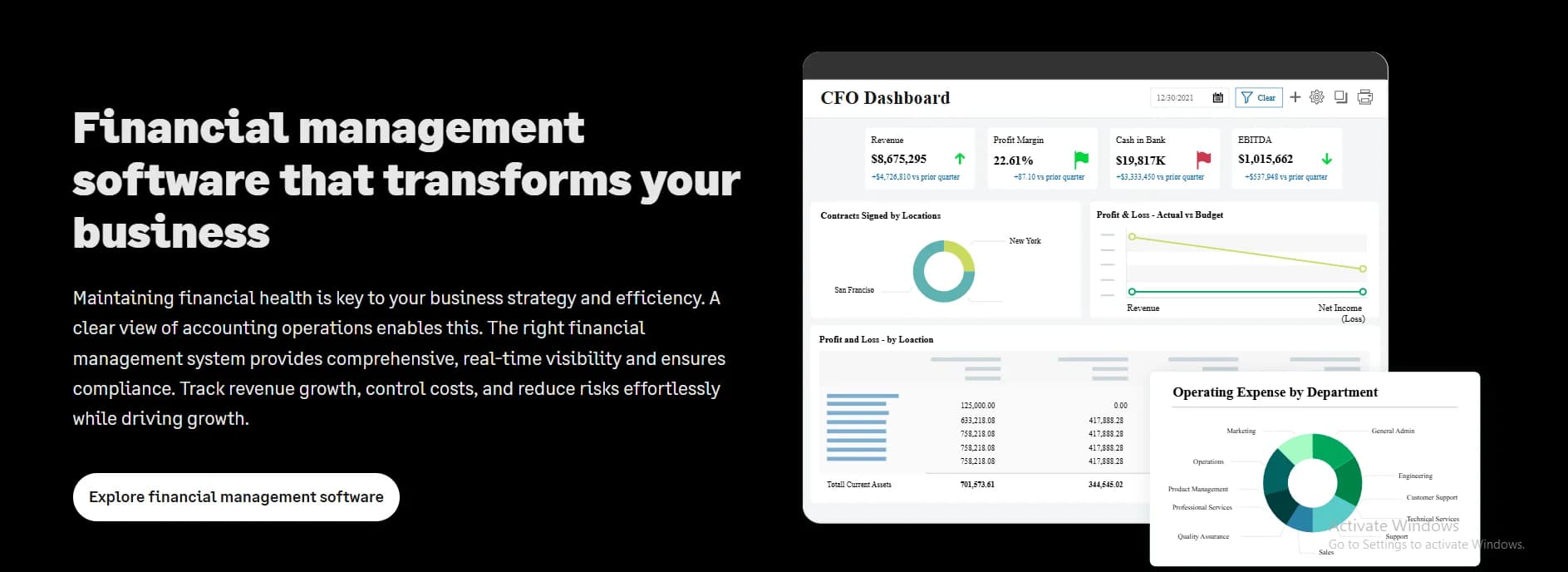
Sage offers different finance and accounting software made for businesses of all sizes. Sage Business Cloud Accounting is good for small businesses and includes features like invoicing, managing inventory, predicting cash flow, connecting bank accounts, handling VAT, using AI to save time, and mobile access. Sage 50 Accounting is for small to medium businesses that need more advanced tools like detailed inventory control, payroll, cash flow tracking, project management, custom reports, multiple user access, and links with other apps. For growing businesses with more complex needs, Sage Intacct is a cloud-based system that provides detailed reporting, automation to reduce manual work, payroll and HR tools, API connections to other software, and can grow with the business.
Key Features
- Simple Invoicing
- Inventory Management
- Cash Flow Forecasting
- Bank Integration
- VAT & Tax Compliance
- AI Automation
- Mobile Access
- Advanced Inventory Control
- Payroll Processing
- Job & Project Tracking
- Custom Financial Reporting
- Multi-User Access
- Third-Party Integrations
Pros
- Works well for small and growing businesses
- Helps with tax rules and reports
- Has mobile apps to use anywhere
Cons
- Some parts take time to learn
- Basic plans don’t have all features, and may need to upgrade
Pricing Plans
-
From $12 - $23
Best Suited For
- Small businesses
- Startups
- Freelancers and sole proprietors
- Businesses needing simple cloud-based accounting
- Companies requiring basic inventory and VAT compliance
8. Kashoo - Financial Management Software for Small Business
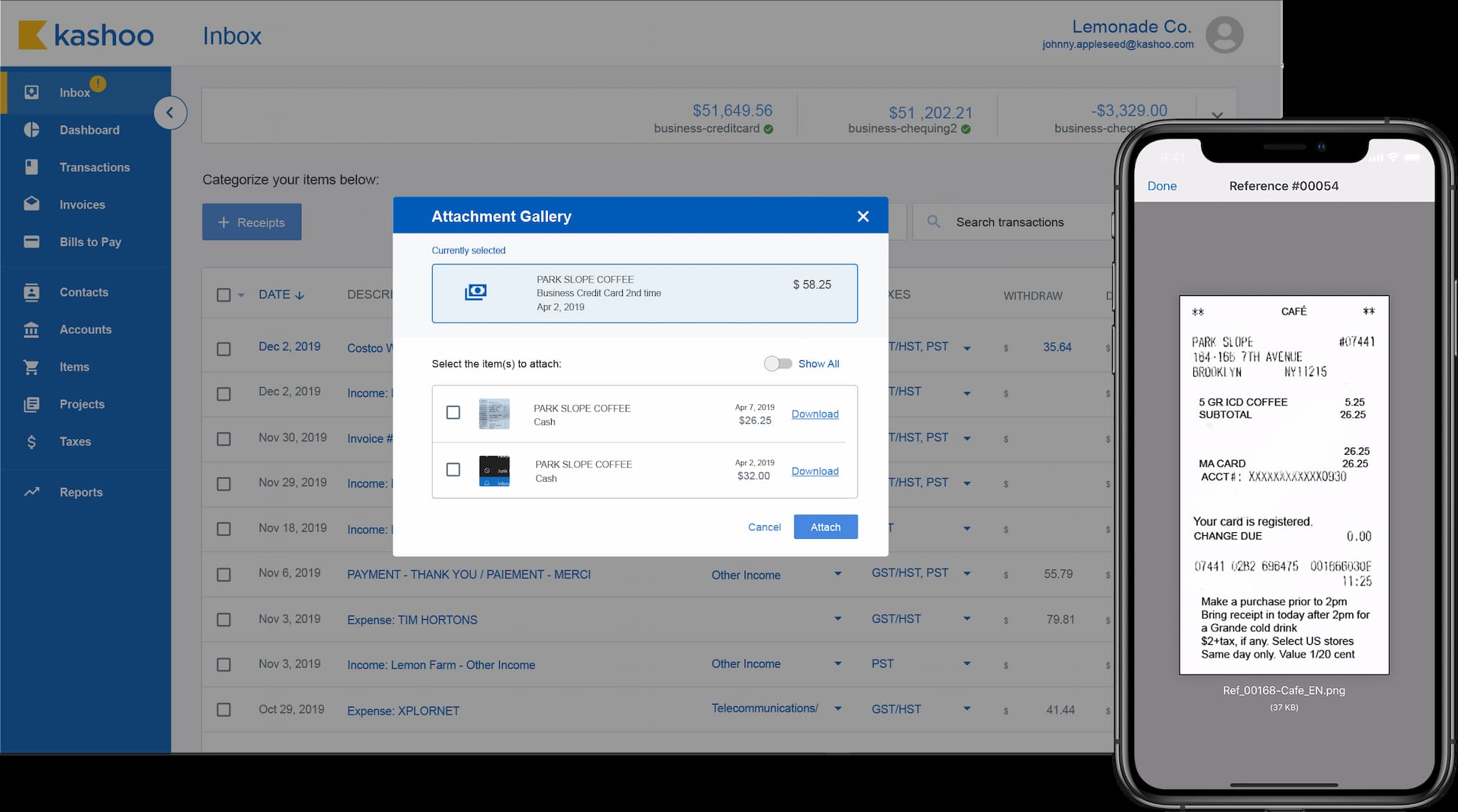
Kashoo is a cloud-based accounting and top financial planning software made for small businesses, freelancers, and digital agencies who want an easy and automatic way to handle their finances. It includes important features like automatic accounting with bank syncing and sorting transactions, creating and tracking invoices and payments, scanning receipts on your phone to track expenses, and real-time financial reports like profit and loss, balance sheets, and cash flow. Kashoo also supports transactions in over 100 currencies with daily exchange rate updates, which is great for businesses working internationally. You can work together by inviting your accountant or team members with different permission levels and accessing your financial data anytime using the mobile apps for iOS and Android.
Key Features
- Automated Accounting
- Invoicing & Payments
- Expense Tracking
- Tax Preparation
- Bank Reconciliation
- Financial Reporting
- Multi-Currency Support
- Mobile Access
- User Collaboration
Pros
- Very easy to use, even for beginners
- Affordable for small businesses and freelancers
- Supports over 100 currencies with daily exchange rates
Cons
- No advanced features like inventory, payroll, or time tracking
- Few connections to other apps compared to competitors
Pricing Plans
-
From $20 - $30
Best Suited For
- Freelancers & Solopreneurs
- Small Businesses
- Digital Agencies
- Service-Based Businesses
9. FreeAgent - Business Financial Management Software

FreeAgent is top-rated financial planning software that helps you create and send professional invoices with ready-made templates and options to pay online, track, and organize expenses. FreeAgent also lets you track your work hours and manage projects to see how much money you make and spend. You can get up-to-date financial reports like Profit & Loss and Balance Sheets, keep up with taxes by filing Self Assessment, VAT, and Corporation Tax directly to HMRC, and use automation features like repeating invoices and dividend reports.
Key Features
- Invoicing & Estimates
- Expense Management
- Bank Feeds & Reconciliation
- Time Tracking & Projects
- Financial Reporting
- Tax Compliance
- Automation
- Mobile App
Pros
- Easy to use, even if you’re not an expert
- Has lots of useful tools like invoicing and tax help
- Helpful customer support during UK work hours
Cons
- Doesn’t connect with as many other apps
- Support only works during UK office hours
Pricing Plans
- 30-day free trial available
- From $11 - $110
Best Suited For
- Tradespeople
- Professional Services
- Creative & Technology
- Retail & Hospitality
- Landlords
- Accountants & Bookkeepers
10. QuickFile - UK-based Best Finance Management Software
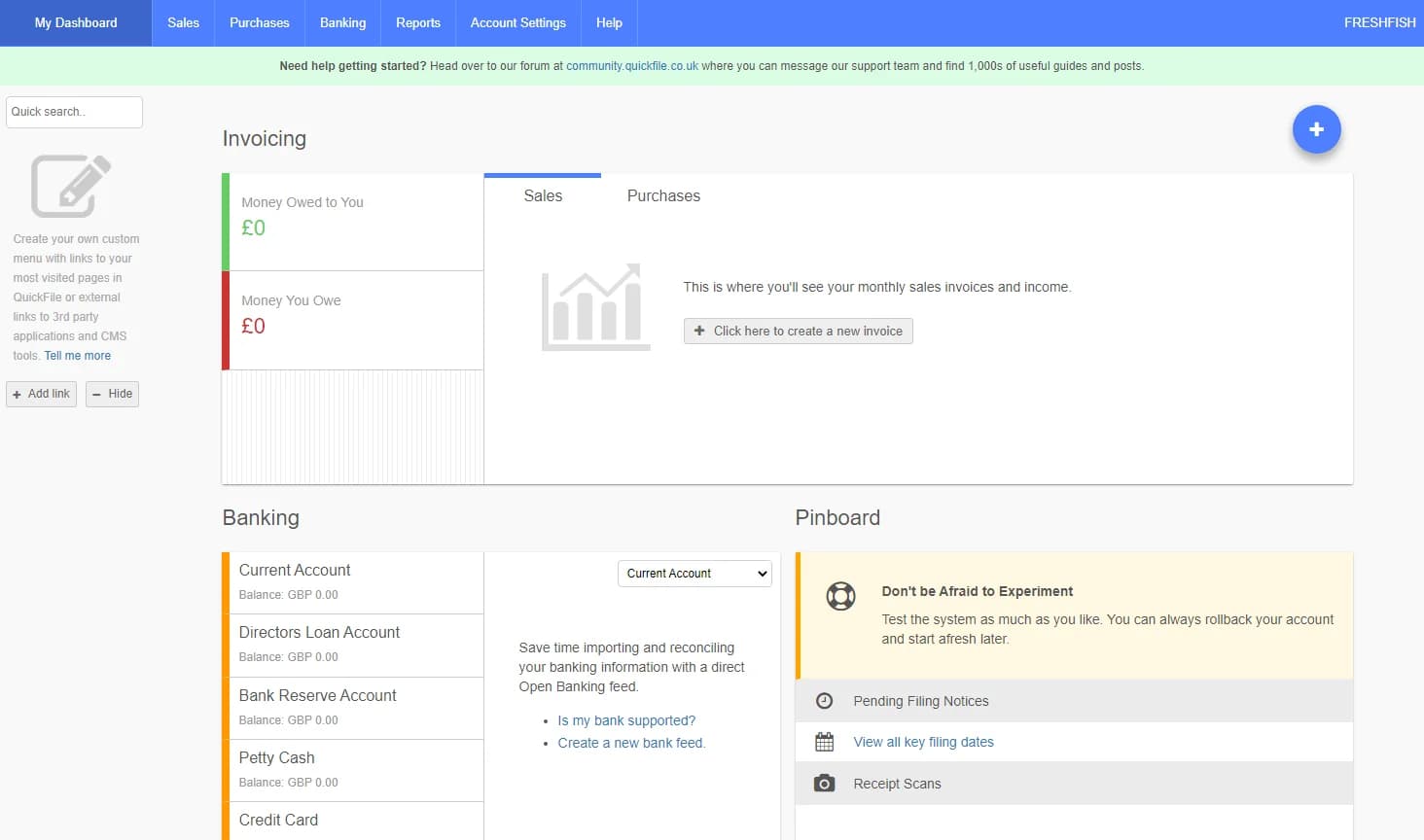
QuickFile is a cloud budgeting and planning software from the UK made for small to medium businesses. You can design and send professional invoices with a client portal for easy online payments. It helps track expenses by letting you take pictures of receipts with a mobile app. QuickFile also manages VAT and lets you file returns directly to HMRC. It connects to UK banks to import transactions automatically and match them for easy bank reconciliation. The software can create financial reports to help you understand your business better. It keeps your data safe with two-factor login and regular backups. You can also customize invoices to match your brand and connect QuickFile with over 300 other apps, like payment systems and CRM tools.
Key Features
- Professional Invoicing & Client Portal
- Expense Tracking & Receipt Management
- VAT Management
- Bank Integration & Reconciliation
- Financial Reporting & Analytics
- Mobile Accessibility
- Security & Data Protection
- Custom Trading Styles
- Integration with Third-Party Applications
Pros
- Easy to use, even if you’re new
- Has a free plan and cheap paid plans
- Helpful community for support
Cons
- Support is mostly online, no phone help
- The website looks old, and logging in can be tricky
Pricing Plans
- Free plan available
- From £60/year + VAT
Best Suited For
- Small businesses
- Freelancers
- Sole traders
- Startups
- UK-based companies needing simple accounting
Another 10 Finance Software Tools
11. NetSuite ERP - Best budgeting and forecasting software for Medium to large businesses.
12. MYOB - Best financial forecasting software for Small to medium businesses, mostly in Australia and NZ.
13. Odoo Accounting - Best small business budgeting software for flexible business apps.
14. ZipBooks - Best budgeting and planning solutions for freelancers and small businesses.
15. Brightbook - Best accounting software for home and business.
16. SlickPie - Best financial data management software for small businesses.
17. GnuCash - Best financial reporting and budgeting software for businesses.
18. Sunrise by Lendio - Best financial planning and budgeting software for freelancers and startups.
19. AccountEdge Pro - Best enterprise financial management software for small to medium businesses.
20. Tipalti - Best financial planning analysis software for handling global payments.
Top Features to Look for in Finance Software
Choosing the right financial management solution is very important to manage your business finances well. Here are the main features small businesses should look for:
-
Invoicing and Billing - The software should let you make professional and customizable invoices quickly. Features like automatic recurring invoices and payment reminders help you get paid on time and save you from doing extra work.
-
Expense Tracking and Management - Good software should let you easily add and organize your expenses. It should also let you upload receipts (often using a phone app) and help you watch your spending to keep your budget in control.
-
Bank Account Integration and Reconciliation - Connecting your bank accounts directly to the software lets it import your transactions automatically. This saves time and reduces mistakes when checking your records, so your finances stay accurate.
-
Real-Time Financial Reporting and Dashboards - Look for tools that show updated reports like profit & loss, balance sheets, and cash flow summaries. These reports help you understand how your business is doing and make better financial decisions.
-
Tax Management and Compliance - The software should make tax work easier by calculating taxes, creating tax reports, and helping with filing according to your country’s rules. This helps avoid mistakes and fines during tax time.
-
Payroll Processing - If you pay employees or contractors, having payroll features in the personal financial software saves time. It should calculate wages, taxes, and produce pay slips or tax forms.
-
Mobile Access and Apps - Many business owners work while moving around. Mobile-friendly IT financial management software or apps let you manage invoices, expenses, and reports anytime, anywhere.
-
Multi-User Access and Collaboration - The enterprise financial planning software should let you add users like accountants or helpers with different access levels to make teamwork easier and keep your data safe.
-
Data Security and Backup - Security is very important. Choose software with strong protection like encryption, two-step login, and automatic backups to keep your money info safe from hackers or accidents.
-
Scalability and Customization - Pick software that can grow with your business. It should offer extra features or better plans when you need things like inventory management, project tracking, or support for different currencies.
-
Integration with Other Business Tools - Your finance and budgeting automation software should work well with other systems you use, like payment processors, customer management, online stores, or tax services, to make your work easier.
How to Choose the Right Finance Software for Business
A recent survey shows that 70% of small businesses find it hard to pick software that fits what they really need. Here’s a clear guide to help you find the best software for your business in 2025.
Understand Your Business Needs and Priorities
Before looking for software, make a list of your financial tasks. Do you mainly send invoices? Manage payroll? Keep track of inventory? A report found that 62% of small businesses spend the most time on invoicing and payments. If this sounds like you, find software with good invoicing and payment tools. If you run a service business, features like time tracking and project billing might be important. For stores or product businesses, inventory management and support for multiple locations matter most.
Set a Realistic Budget
Financial management software prices can be very different, from free options like Wave to expensive tools like NetSuite ERP, which can cost thousands each year. Surveys show that over half of small businesses spend between $50 and $280 per month on finance software. Keep in mind, cheaper software might not have all the features you need or good customer support. Also, check if there are extra fees for more users or special add-ons.
Plan for Growth with Software
Your business will grow, and your software should too. Studies show businesses that pick software that can grow avoid spending a lot to switch later. Look for software that lets you upgrade easily, handles different currencies and languages if you work with other countries, and can manage more transactions as your business gets bigger.
Choose Software That’s Easy to Use
Easy-to-use software saves you time and helps avoid mistakes. Many business owners find complicated software hard to use, which causes errors and slows work. Try free trials or demos to see if you can learn the system fast. Look for clear screens and automatic processes that help you get your work done faster.
Check If It Integrate Well with Your Other Tools
Software that connects with your bank, payment systems like PayPal, online stores like Shopify, or customer management apps will save you from typing in data again. Businesses that use connected tools get more work done in less time. Make sure your finance software can link up with the other tools you use every day.
Make Security a Priority to Keep Your Data Safe
Financial data is very private and needs strong protection. Look for the best financial reporting software with high-level encryption, two-step logins, and regular backups. If it’s cloud-based, check that the company follows important security rules and clearly explains how your data is kept safe.
Use Free Trials and Test Support Services
Most expense tracking software companies let you try their product free for 14 to 30 days. Use this time to test the main features, check how fast and helpful their customer service is, and see if the software fits your daily work. Good support is very important when you need help.
Future Trends in Finance Software
Knowing the latest trends can assist you in picking tools that keep your business strong. Here are some important trends shaping the future of finance software for small businesses.
Artificial Intelligence (AI) and Machine Learning
AI is changing finance software by doing simple jobs automatically and giving smart advice. A report from 2024 says that 67% of small businesses want to use AI tools to handle bookkeeping, find fraud, and make financial predictions. AI can study how you spend money, warn you about unusual transactions, and help you make better budgets to save time and reduce mistakes.
More Use of Cloud and Remote Access
Cloud finance software is growing fast because it lets you work from anywhere with internet. Experts say that by 2026, 85% of small businesses will use cloud-based finance tools. This means you and your team can manage money anytime, on any device - great for working from home or from different places.
Automated Tax Help and Reports
Tax rules change a lot and can be tricky. Future finance software will do more to help with taxes automatically, making sure you follow the latest rules and deadlines. This helps you avoid fines and saves time on tax work, so you can focus on your business.
Using Blockchain for Safety and Clear Records
Blockchain is a new technology that can keep financial records safe and unchangeable. Some finance software is starting to use blockchain to make transactions and audits more secure, giving you more trust in your data.
Personalized Money Advice and Forecasts
With better data tools, future finance software will give advice based on your business’s own money habits. It will warn you about possible cash problems, suggest budget changes, and help find ways to grow. This makes planning your money easier and more accurate.
Frequently Asked Questions
Which finance software is best for freelancers and solopreneurs?
TechForing Cent, FreshBooks, Wave Accounting, and Kashoo are good choices for freelancers and solopreneurs. They make invoicing, tracking expenses, and managing money easy without needing much accounting knowledge.
Can finance software help with tax filing and compliance?
Yes, finance software organizes your income and expenses clearly and makes reports that follow the latest tax rules. This helps you avoid mistakes and fines, making tax filing faster and easier.
Is it difficult to switch from manual accounting to finance software?
It can be simple if you pick easy-to-use software and try free trials. Many finance programs help you move your data and teach you how to use the system, which lowers mistakes and saves time.
Can finance software handle payroll and employee payments?
Yes, many finance software programs can handle payroll. They calculate wages, taxes, and create pay slips or tax forms. Some popular ones, like TechForing Cent, QuickBooks, and Sage, offer full payroll services, but it may depend on where your business is.
Are finance software solutions suitable for businesses with international clients?
Yes, many finance software like TechForing Cent support multiple currencies and languages, which is good if you work with clients in other countries. They also update exchange rates daily and help with tax rules in different places.
Final Thought
Picking the best expense tracking software can really help your small business run better. There are many choices, so it’s important to find one that fits your needs and keeps your finances organized.
One great choice is TechForing Cent. It is a strong and easy-to-use tool that helps small and growing businesses manage budgets, cash flow, payroll, and financial reports in real time. Its smart features help you plan better and focus on growing your business.
