
Category: Articles
Top 10 Attendance Management Software for 2025
TABLE OF CONTENT :
If you’re an HR manager at a small or medium-sized business, you probably know how hard it is to keep track of attendance manually. Using paper or spreadsheets often leads to mistakes, and fixing them takes extra time and money.
That’s why many businesses now use time and attendance management software. These tools track time automatically, show real-time updates, and connect easily with payroll and HR tools.
In this article, we’ll share the top 10 attendance management software in 2025 to help you choose the right one for your team.
What is an Attendance Management System?
An attendance management system is a monitoring tool that tracks when employees start and finish work, and how many hours they work. It keeps records in a structured format to help with payroll, leave requests, and following company schedules.
There are two main types:
- Manual systems - paper logs or time cards; simple but error-prone and extremely time-consuming.
- Software systems - automated and more accurate; use tools like biometric scanners, swipe cards, or mobile apps to record attendance in real time.
Using an attendance management system reduces mistakes, saves time, and gives HR and payroll teams accurate data.
Benefits of Using Time and Attendance Tracking Software
If you’re still using manual methods to track attendance, switching to a cloud-based attendance system can bring more benefits, such as:
Increased accuracy
Automated time attendance software systems especially reduce human errors, which means employee hours are recorded precisely, helping to avoid payroll mistakes and disputes.
Easy access to attendance data
With attendance software digital records, it’s simple to pull up attendance information whenever you need it, whether for audits, performance reviews, or resolving any discrepancies.
Improved efficiency
Clock-in and out software features like real-time tracking and automatic calculations save valuable time for HR and management. This reduces the administrative burden and frees teams to focus on more necessary business tasks.
Better compliance
Employee attendance software helps make sure you stay aligned with labor laws and company policies by automatically monitoring work hours, breaks, and leave rules. This protects your business from legal risks and penalties.
Powerful insights and decision-making
Built-in analytics and detailed reports in the attendance tracking system reveal attendance trends and patterns. This helps managers spot issues like absenteeism early and make smarter decisions to optimize workforce planning.
Employee empowerment
There are many online attendance tracker systems that incorporate self-service portals where staff can see their own attendance, request leave, or report their absence, which means that the entire process is more transparent.
10 Best Attendance Management Software in 2025
Here are 10 of the best tools to track employee attendance:
- TechForing Human
- Time Doctor
- DeskTime
- Clockify
- Time Champ
- TimeClock Plus
- nsightful.io
- Zoho People
- Deputy
- Monitask
In the next section, we will go through each of these attendance tracking software one by one. You’ll know about their key features, advantages, disadvantages, and pricing.
1. TechForing Human - Best Time & Attendance Tracking Software
TechForing Human is an easy-to-use human resource management system that helps companies track jobs, departments, training, and performance reviews. The attendance feature helps with scheduling shifts, tracking time, and managing leaves without mistakes. It also allows managers to watch employee performance, link bonuses, and handle promotions. The system automatically takes care of employee benefits like gratuity, provident fund, and medical funds to avoid errors. It has a noticeboard to share important news and events, and get employee feedback, which helps improve communication. The time and attendance tracking tool also creates useful reports to help plan and comply with laws. The tools safely store essential documents like contracts and reviews so they are easy to find, and all features work together to make HR tasks faster and more accurate.
Key Features
- Track Attendance: Employees can easily track their time in/out with one click, and the system generates daily and monthly time records and payroll to save time.
- Leave Management: The system handles leave requests and approvals with a click, tracks different leave types, and shows remaining balances to avoid mistakes.
- Manage Shifts: HR can easily publish and modify a shift, proactively avoid schedule conflicts, and improve staff management effectiveness.
- Accurate Timesheets: The system automates attendance tracking to remove errors and speed up payroll calculations.
- Empower Employees: Employees can access and update their attendance records so HR can quit answering attendance-related questions.
Pros
- Track attendance in real time
- Integrate seamlessly with payroll systems
- Access from anywhere via the cloud
- Clock in using biometrics or mobile devices
- Manage leave and holidays automatically
- Generate detailed reports and analytics
- Navigate easily with a user-friendly interface
- Protect data with strong security and privacy measures
Price
- Starter: 20 users, $99/month
- Basic: 21-50 users, $199/month
- Premium: 51-100 users, $249/month

2. Time Doctor - Best Attendance Tracking Software for Remote Teams
Time Doctor stands out as one of the best time and attendance software options for remote teams. It actively tracks when your team starts and ends work, monitors breaks, and shows real-time productivity dashboards so that you always know who’s doing what and when. You can also set up reminders, detect idle time, and even take optional screenshots to keep everything transparent. This work attendance tracker integrates smoothly with tools like Asana, Trello, Slack, and 60+ other work tools, so you can add it into your workflow easily.
Key Features
- Time Tracking: Accurately tracks time spent on tasks, clients, and projects with real-time insights to boost team productivity and accountability.
- Productivity Monitoring: Records website and app usage, tracks active versus idle time, and provides optional screenshots for complete transparency.
- Attendance Management: Automatically records attendance, marks late logins or absenteeism, and compares scheduled hours to actual time worked.
- Work-Life Balance Insights: Monitors overtime, weekend work, and workload trends to support healthier work habits and prevent burnout.
- Team Performance Dashboards: Offers visual dashboards with daily and weekly reports to give managers a clear view of team efficiency.
Pros
- Helps teams stay accountable and reduce time-wasting
- Provides detailed reports that make project management more efficient
- Automatically turns tracked hours into ready-to-use timesheets
Cons
- Some employees may feel uncomfortable with the monitoring features
- Syncing between the desktop and mobile apps occasionally causes issues
Price
- Free demo available (14 days)
- From $6.70 - $16.70/user/month

3. DeskTime - Best Time and Attendance System for Productivity Monitoring
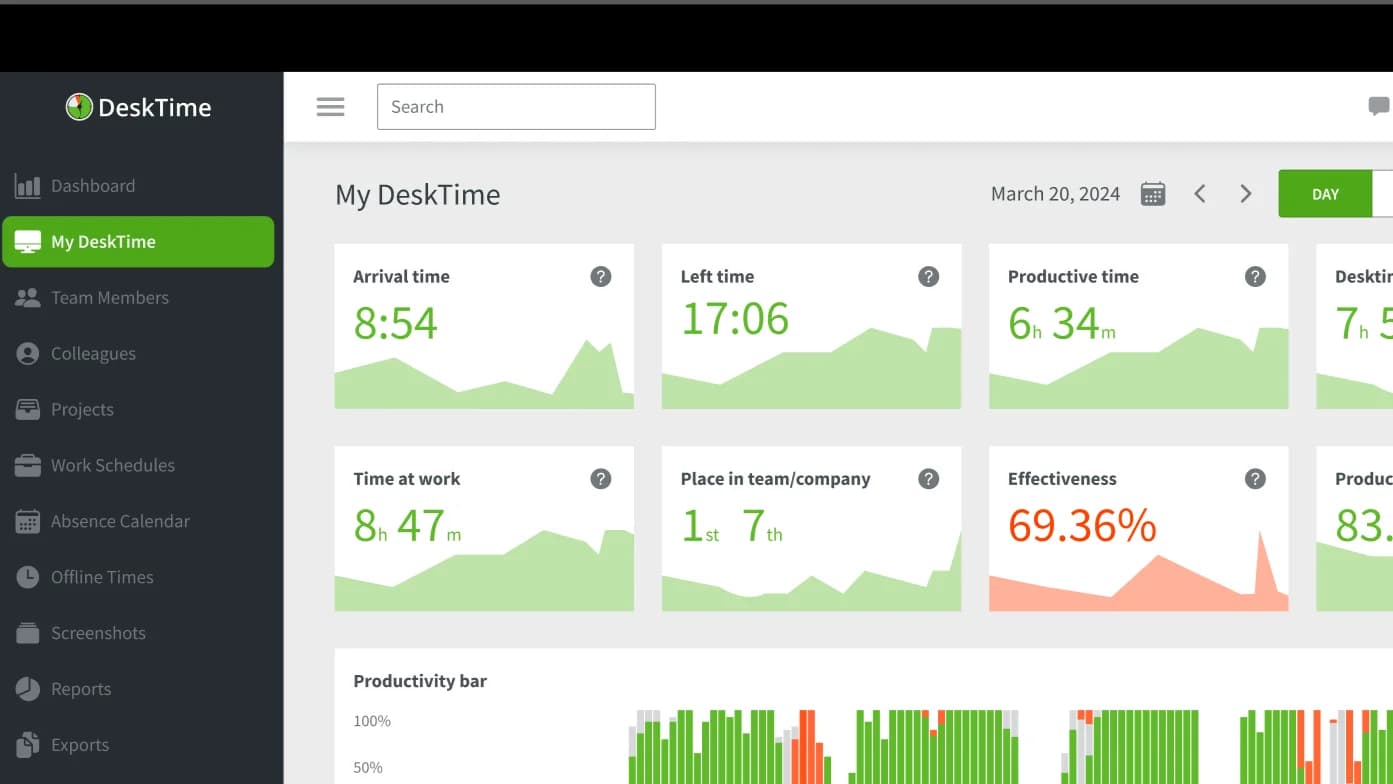
DeskTime is an attendance tracking and productivity management tool designed to track work hours automatically, as well as app and website usage, and offer manual and offline time logging for complete activity coverage. With features like productivity categorization, automatic screenshots, document title tracking, and the "Private Time" option, it balances accountability with employee privacy. Additionally, this employee attendance tracker comes with shift scheduling, absence tracking, Pomodoro timers, and a complete performance report. DeskTime also has multiple third-party software integrations, including Jira, Trello, and Google Calendar.
Key Features
- Time Tracking: Automatically tracks all computer activities and working hours with no need for manual entry, making timesheets a clean and easy process.
- Project Time Tracking: Records time spent on specific projects and tasks to improve project management and client billing accuracy.
- Shift Scheduling: Make it simple to create employee shifts and manage shift requests with scheduling templates - optimise your workforce schedules.
- Private Time: Allows employees to pause time tracking for private issues and brings respect for privacy into the conversation.
- Detailed Reports and Dashboards: Create in-depth reports and visual dashboards to track employee productivity and team performance.
Pros
- Offers great features at a competitive price
- Provides real-time data to admins, helping maintain transparency
- Users find the interface easy to navigate, so they can implement it quickly
Cons
- Constant monitoring may increase stress levels among employees
- Sometimes, the software fails to auto-start, which causes inconvenience
Price
- Free demo available
- From $7 - $10/user/month
4. Clockify - Best Time and Labor Management System for Small Businesses
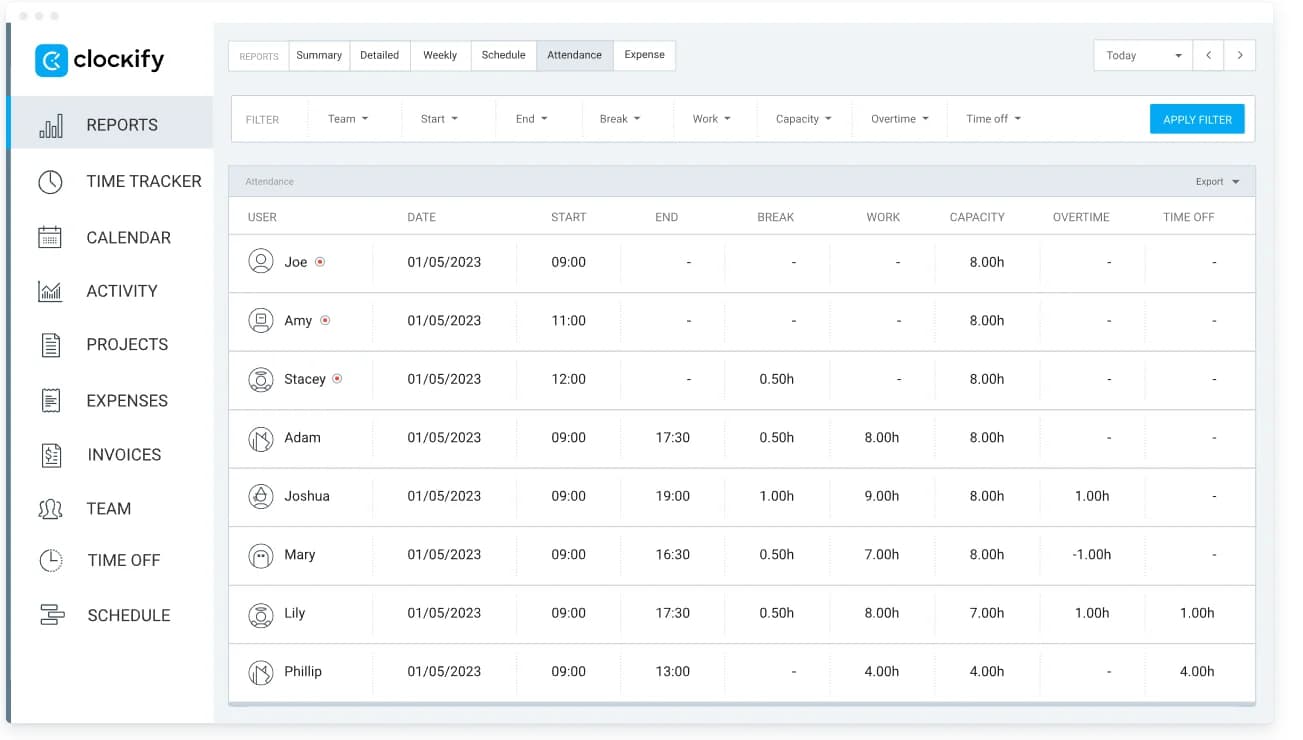
Clockify ranks as one of the best employee time and attendance software programs that helps teams manage their time on projects and tasks. It lets users track time with timers, timesheets, clock-in/out kiosks, and calendar views. The software provides dashboards, project progress tracking, forecasting, detailed reports, and activity monitoring to keep everyone informed and focused. For management, Clockify enables teams to handle time-off requests, track expenses, create invoices, and schedule shifts easily. The employee attendance record tools integrate with over 80 popular apps across mobile devices, desktops, and browsers.
Key Features
- Time Tracking: Tracks time via timer or manual entry across devices for precise and effortless work hour logging.
- Reporting: Creates customizable, exportable reports on time, expenses, and projects to monitor productivity and progress.
- Scheduling: Plans and assigns tasks visually with calendar integrations for seamless team coordination and planning.
- Timesheets & Approval: Logs weekly timesheets with templates, submits for manager approval, and sends reminders for timely entries.
- GPS & Activity Tracking: Tracks team locations and activities via mobile app to manage field employees effectively.
Pros
- Multiple time tracking methods (timer, timesheet, calendar, offline)
- Easy-to-use interface with mobile sync
- Responsive customer support and helpful resources
Cons
- No direct payroll integration (manual export needed)
- The kiosk feature can be tricky to use
Price
- Free demo available
- From $3.99 - $12.99/user/month
5. Time Champ - Best for Employee Attendance Monitoring and Productivity Tracking
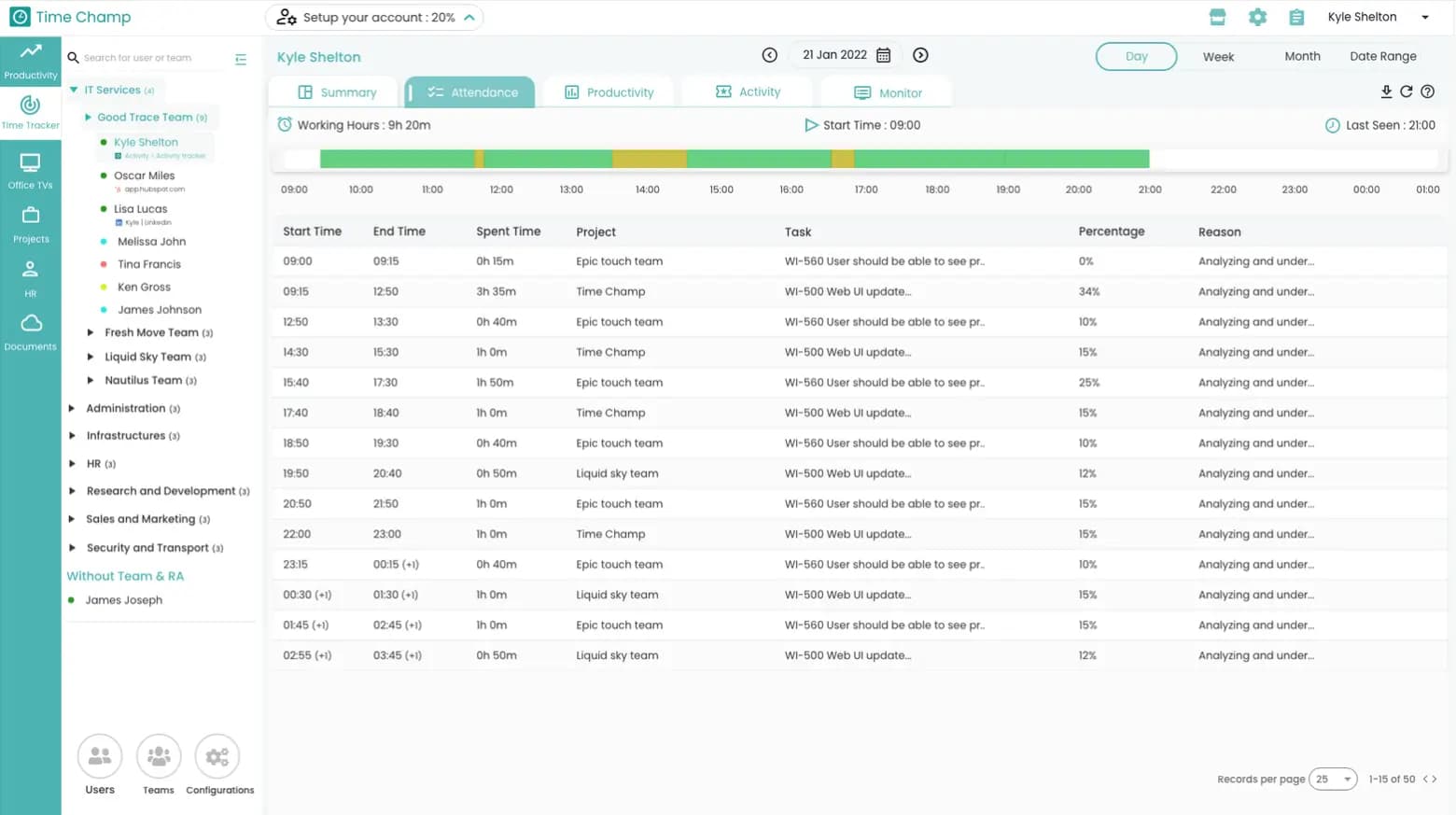
Time Champ helps organizations increase productivity and manage team performance across in-office, remote, and hybrid setups. It automatically tracks time, generates accurate timesheets, and monitors employees with features like screen recording and activity tracking. Time Champ supports remote work by tracking attendance, analyzing location-based performance, and offering flexible monitoring tools. The leave and attendance management software also simplifies HR operations by managing employee directories, leave requests, and organizational charts. Additionally, it integrates with platforms like Jira, Trello, and Slack, and includes an intelligent chatbot that delivers real-time updates within collaboration apps.
Key Features
- Time Tracking: Logs employee work hours with or without internet. Geofencing and an online or offline timer to always know how many hours have been worked.
- Productivity Monitoring: Labels websites and apps as productive or unproductive, provides AI-based insights, and helps identify focus trends for improved efficiency.
- Attendance & Shift Management: Handles multiple shift schedules, logs attendance data with late arrival tracking, and simplifies payroll with exportable reports.
- Employee Monitoring: Records live activities on the screen, keystrokes, and cam/mic input (optional) to hold employees accountable and transparent for their work habits.
- HR & Leave Management: Maintains a centralized employee directory, automates leave tracking, and generates balance reports with clear organizational structure views.
Pros
- Easy-to-use and intuitive interface
- Customizable and exportable reports
- Great for managing remote and hybrid teams with GPS tracking
Cons
- Idle time detection can be inaccurate during meetings
- Occasional slow performance or app crashes
Price
- Free demo available
- From $3.90 - $13.90/user/month
6. TimeClock Plus - Best Tools for Employee Attendance and Workforce Management
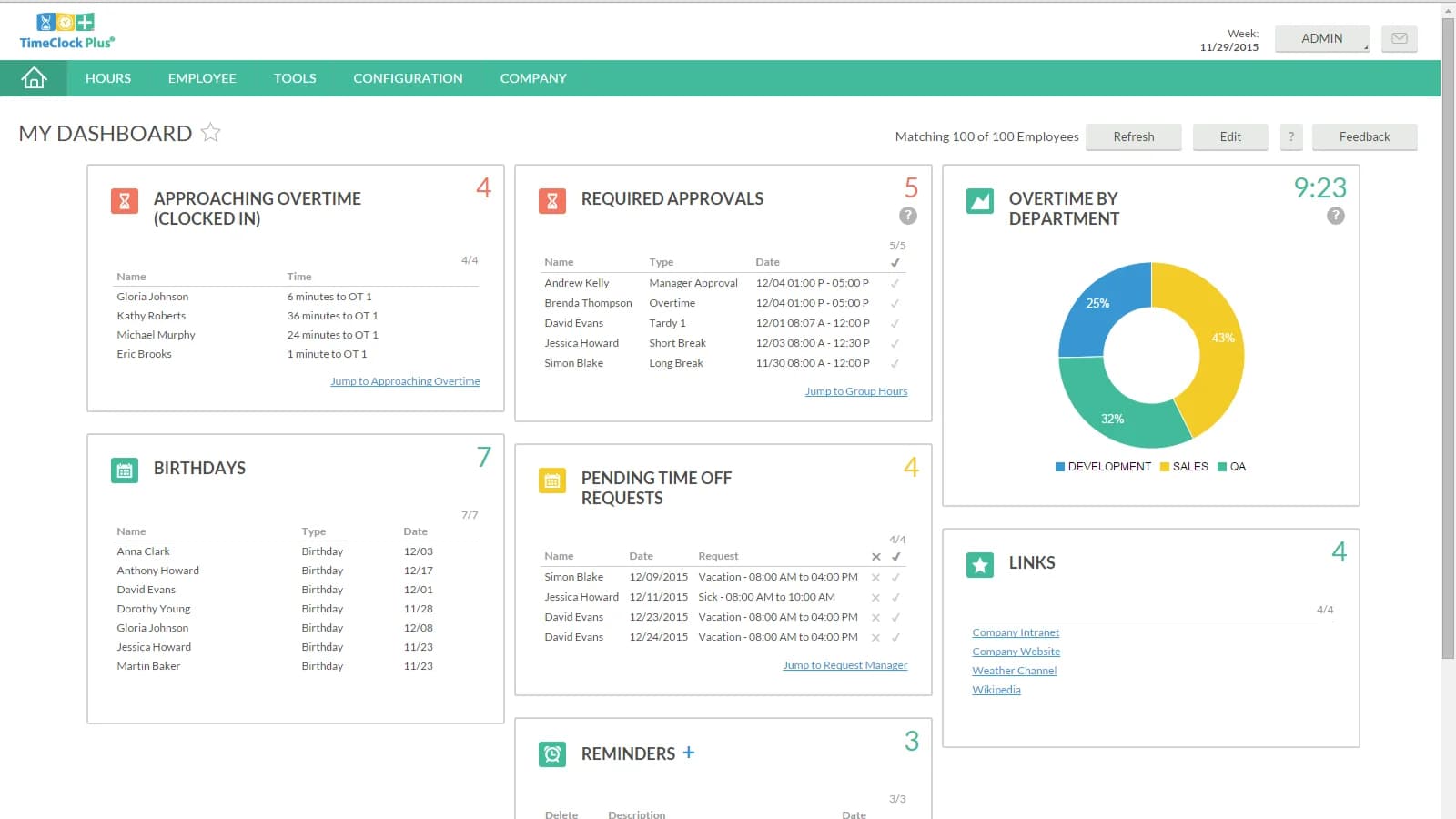
TCP Software provides powerful workforce management tools that help businesses schedule, track employee time, and control labor costs. With TimeClock Plus, you can automate time and attendance using biometric clock-ins, geofencing, leave tracking, and seamless payroll integration. Small businesses can rely on Humanity Time for digital timesheets, break and overtime tracking, and reusable schedule templates. TCP customizes these tools for industries such as education, healthcare, manufacturing, public safety, retail, and hospitality to improve efficiency, lower costs, and improve employee satisfaction. You can also integrate this time attendance tracking software with SAP, ADP, Oracle, and Workday.
Key Features
- Time Tracking: Tracks employee hours accurately using biometric badge readers, mobile apps, and geofencing to capture reliable time logs across all locations.
- Scheduling & Shift Management: Uses AI-powered forecasting to support real-time schedule adjustments, and allows employees to view, swap, or request shifts easily.
- Attendance & Compliance: Records attendance data, manages absences, tracks late arrivals, and helps you maintain compliance with labor laws through detailed reports.
- Integration & Payroll Support: Integrates smoothly with leading payroll and ERP systems to streamline payroll processing and labor cost management.
- Security & Compliance: Protects data with SOC 2 and SOC 3 compliance, TX-RAMP Level 2 certification, and a dedicated security team maintaining strong safeguards.
Pros
- Flexible time tracking methods (biometric, mobile, web, badge)
- AI-powered, real-time employee scheduling
- Specialized tools for the public safety and education sectors
Cons
- The mobile app has limited advanced features
- Some users report integration issues with third-party software
Price
- Free demo available
- Price upon request
7. Insightful.io - Best Attendance Manager Software for Remote and Hybrid Teams
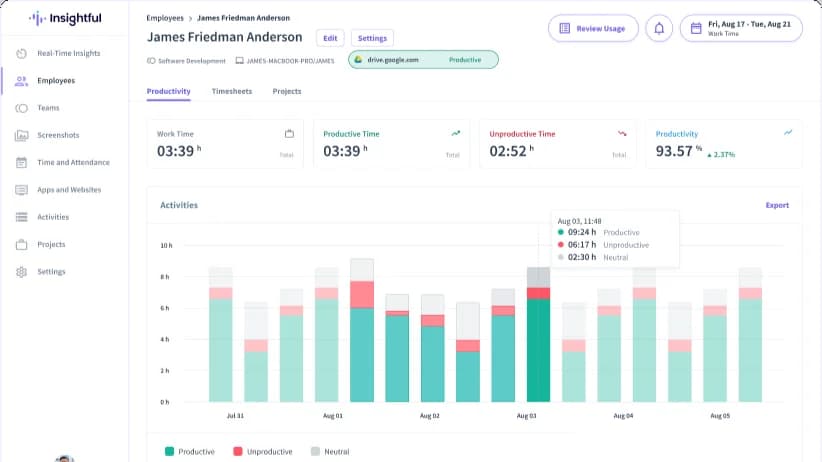
Insightful.io helps organizations optimize workforce performance and workflows by providing real-time data, especially for remote and hybrid teams. It monitors employee activity through screen captures, logs, and location insights. It tracks time automatically, using AI to categorize tasks and separate billable hours. Its InsightsAI tool delivers instant answers, trend analysis, and custom reports to guide decision-making. The time and attendance software platform boosts productivity by showing activity heatmaps, categorizing technology usage, and benchmarking performance. Insightful integrates with over 50 popular apps like Slack, Microsoft Teams, Jira, and Trello. It secures data with strong encryption and meets compliance standards, including HIPAA, SOC 2, ISO 27001, and GDPR.
Key Features
- Time Tracking: Tracks employee hours accurately with real-time attendance, project time tracking, and automatic time mapping to ensure tasks stay on track.
- Productivity Monitoring: Monitors team activity with live insights, app & website usage, and productivity trends for better focus and clarity.
- Employee Monitoring: Captures screen activity, tracks idle and active time, and provides detailed reports to help understand work habits and performance.
- AI-Powered Analytics: Uses AI (InsightsAI) to generate instant, actionable insights, trend analysis, and custom reports for more intelligent, faster decision-making.
- Security & Risk Management: Enhances security with insider threat detection and supports data protection across remote and hybrid work environments.
Pros
- Detailed productivity and activity reports
- Real-time employee activity monitoring
- Accurate automatic time mapping
Cons
- Limited native integrations
- No mobile app available yet
Price
- Free demo available
- From $8 - $15/user/month
8. Zoho People - Best HR Attendance Tracker for Employees
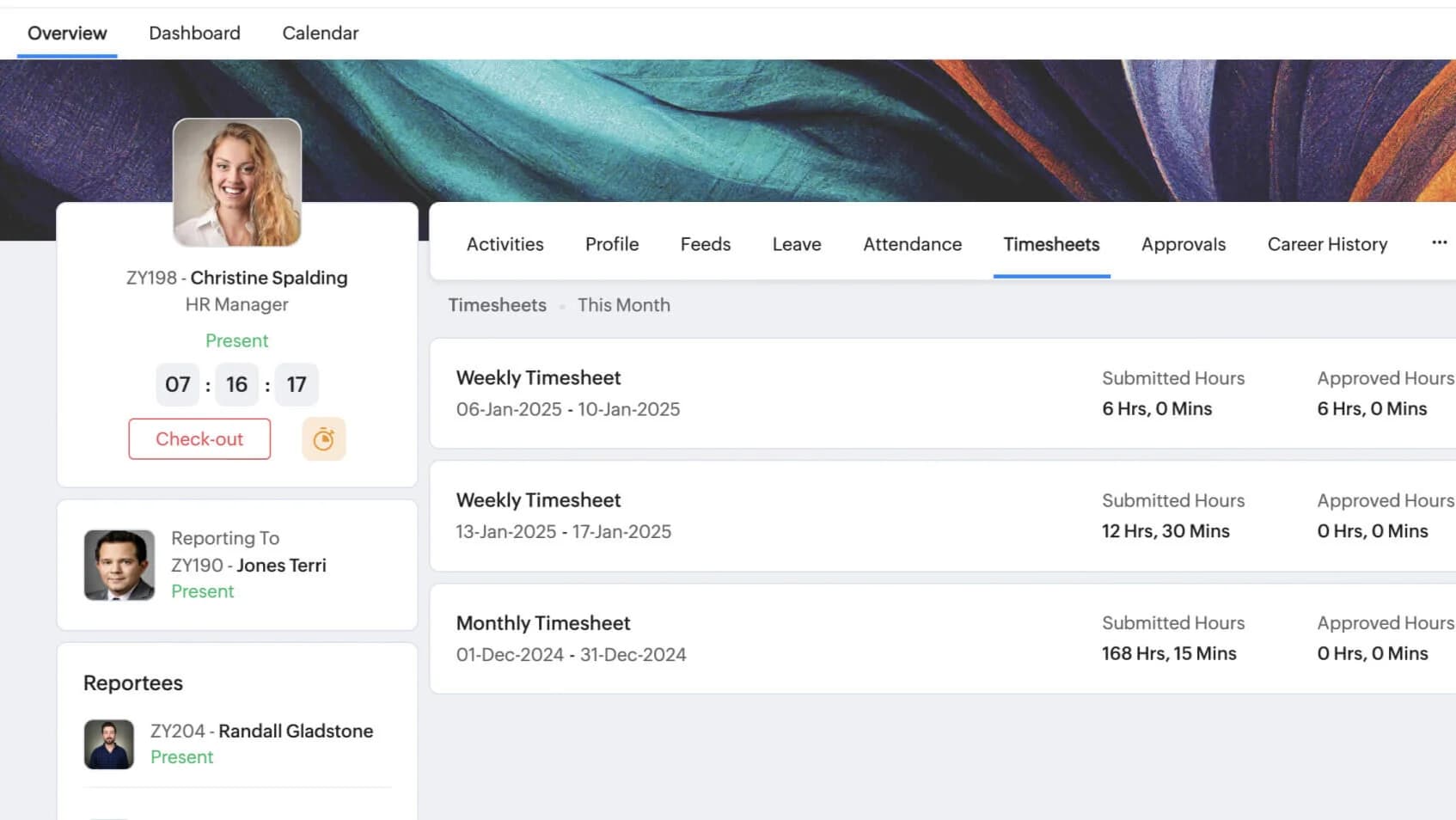
Zoho People helps businesses manage their HR tasks easily with a simple and powerful cloud-based system. The time attendance management software keeps all employee information in one place and tracks time and attendance automatically. Zoho People connects with Zoho Recruit to make hiring and onboarding smooth and lets you create custom onboarding steps. The built-in training system lets employees learn new skills and track progress. You can create reports to understand your workforce better and automate routine tasks like approvals. The mobile app enables you to handle HR work anytime, anywhere, which is great for remote teams. Zoho People integrates smoothly with third-party tools such as Zoho Payroll, Microsoft 365, and Google Workspace.
Key Features
- Time and Attendance: Automate time tracking as employees clock in via web, mobile, or biometric devices, track timesheets, schedule shifts, and monitor absences.
- Performance & Learning: Set and track employee goals, gather 360-degree feedback, and deliver training programs through the built-in learning management system.
- HR Analytics & Reporting: Generate customizable reports and interactive dashboards with advanced analytics to help make informed, data-driven HR decisions.
- Document Management: Store employee documents, collect digital signatures through integrations, and monitor compliance to keep your organization aligned with labor laws.
- Workflow Automation: Automate HR tasks like approvals, notifications, and reminders with custom workflows, email alerts, and checklists to increase efficiency.
Pros
- Comprehensive HR features (attendance, leave, performance)
- Affordable pricing starting at $1.50
- Seamless integration with the Zoho ecosystem
Cons
- Limited integrations with third-party apps
- Mobile apps can lag or crash occasionally
Price
- Free demo available
- From $1.50 - $5/user/month
9. Deputy - Best Workforce Management and Employee Attendance Application
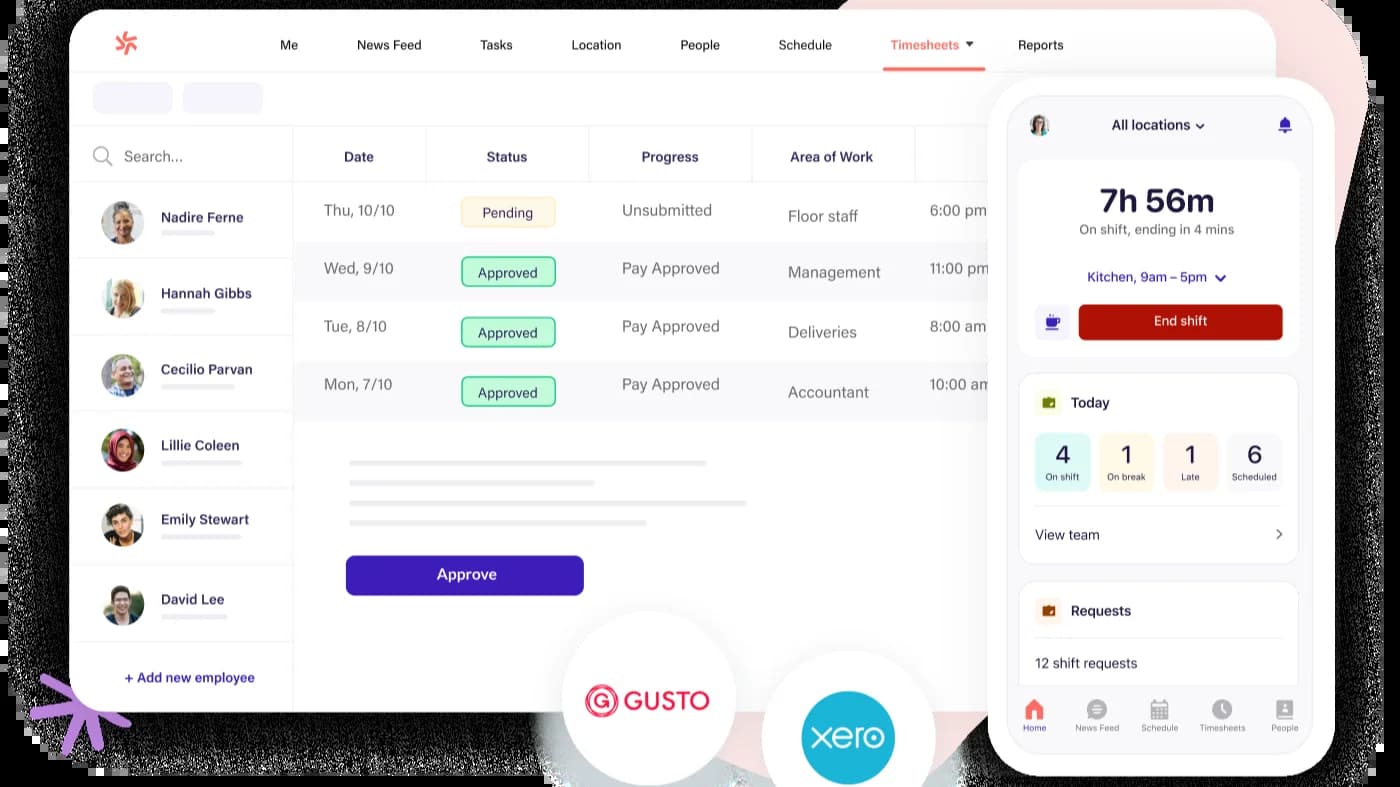
Deputy is one of the best attendance monitoring systems that helps managers quickly create and share work schedules using simple drag-and-drop tools. You can also see when you need more staff based on busy times and let employees swap or find cover for shifts without extra hassle. Employees can clock in/out using their phones or computers, and managers can watch attendance in real time. The staff attendance tracker platform helps businesses follow labor laws by automatically handling wages, breaks, and overtime, and it asks employees to confirm any changes to their schedule. With over 50 integrations like payroll and accounting software, Deputy offers a flexible, all-in-one solution that helps businesses run smoothly.
Key Features
- Employee Scheduling: Automate shift planning based on employee availability, skills, and labor demand using innovative, AI-powered scheduling tools.
- Time and Attendance: Track hours with GPS-enabled clock-ins, approve digital timesheets, and monitor breaks and overtime in real-time.
- Leave Management: Employees request leave via mobile; managers approve instantly while tracking balances and ensuring proper staffing.
- Labor Cost Control: Set wage budgets, receive overtime alerts, and monitor live labor costs against sales to reduce overspending.
- Mobile App Access: Employees manage shifts, request changes, and receive updates directly through the Deputy app on any device.
Pros
- Easy-to-use interface for managers and staff
- Accurate GPS and facial-recognition time tracking
- Integrates well with payroll and HR systems
Cons
- Slow or unresponsive customer support
- Occasional integration glitches
Price
- Free demo available
- From $4.50 - $6/user/month
10. Monitask - Best Time and Attendance Systems for Small Businesses
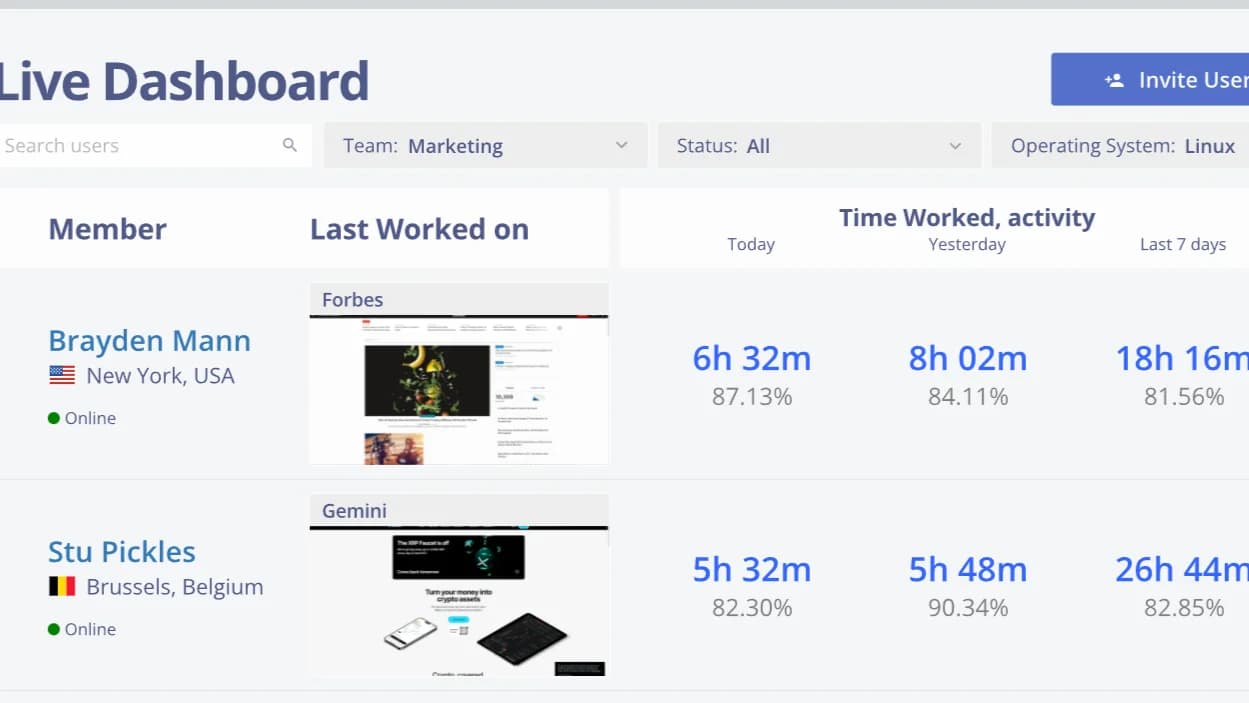
Monitask is an easy-to-use attendance tracker software tool that helps businesses track employee time in/out and productivity, especially for remote teams. It functions on many devices like Windows, Mac, Linux, iOS, and Android. Employees can start and stop their work time manually, or the app can do it automatically. Monitask shows when employees clock in and out and tracks their activity during work hours. It also monitors which apps and websites they use and takes random screenshots to make sure work is getting done, while blurring sensitive info to protect privacy. The time track attendance software tool creates simple reports and timesheets, which can connect directly to payroll systems.
Key Features
- Time Tracking: Manage employees' work hours using timesheets, identify wasted time, and report profitability with time tracking.
- Productivity Monitoring: Track applications and websites used within work hours and idle time, and take screenshots to improve transparency and confidentiality.
- Reporting & Analytics: Generate customizable reports and gain instant access to live dashboards to analyze employee usability, project status, and time management.
- Employee Monitoring: Maintain ethical oversight with employee notifications, optional stealth mode for discreet monitoring, and VPN/IP tracking for enhanced security.
- Workforce Management: Schedule staff, authorize time-off requests, and connect payroll on a centralized platform, and improve human resources procedures.
Pros
- Affordable pricing for small to mid-sized businesses
- Detailed time tracking with automated screenshots
- Customizable reports for performance analysis
Cons
- Lacks some advanced monitoring features
- Limited data export after the service ends
Price
- Free demo available (10 days)
- From $5.99 - $8.99/user/month
How to Select the Best Employee Attendance Management Software
If you’re planning to buy time attendance management software, make sure to check all the available options and choose the one that fits your business best. Here are the things you should look for:
Make sure the software offers:
- Clock-in and clock-out options
- Leave management and PTO tracking
- Overtime calculation
- Shift scheduling and management
- Mobile app support for remote or field employees
- Real-time attendance syncing for accurate records
- GPS location tracking to verify employee check-ins
- Biometric or photo authentication to prevent buddy punching
- Notifications and alerts for missed punches or irregular attendance
- Support for multiple work shifts and flexible hours
- Ability to handle paid and unpaid breaks
- Integration with time-off policies and accrual tracking
Integrations
The attendance system software should work smoothly with your existing HR and payroll systems. This will help automate data transfer and reduce manual entry errors.
Analytics and reporting
Find a time and attendance management software system that offers adjustable attendance reports and data insight. You can use this knowledge to get a grip on attendance patterns, absenteeism rates, and productivity trends.
Automation
Features such as automated leave approvals, shift reminders, and even alerts for attendance anomalies (such as late arrivals again and again) help not just save time but also enhance accuracy.
Security and Compliance
Make sure the track employee attendance system is compliant with local labor and data privacy laws. Data safeguards, such as encryption and audit logs, should be in place to protect sensitive employee information.
Pricing and free trial options
Select the cloud-based time management software that has customizable pricing. Look for vendors that provide a free trial so that you can decide if the software is the right fit for your needs before you make a purchase.
Frequently Asked Questions
What is Attendance Management Software?
Attendance management software makes it easy to track your employees’ attendance, work hours, and time off. It automatically records clock-ins, clock-outs, and absences, so you always have an accurate record without chasing timesheets or fixing manual errors. Some systems even include GPS tracking to verify locations.
How does leave and attendance management system software Work?
Employees can clock in and out using their phone or computer, and the software automatically records their hours. You can see who’s working, track time off, and manage late check-ins or overtime. Most attendance tracking systems use a time clock and may include GPS to make sure employees clock in from the right location. You can also get reports to spot attendance patterns, manage leave, and stay organized.
What attendance management software can I download for free?
Many employee attendance monitoring system providers let you download free versions or try their tools for free. For the best payroll time and attendance software for small businesses, we recommend TechForing Human. Its free plan gives you a wide range of attendance features all in one platform.
How can I track employee attendance with software?
You can easily track employee attendance using attendance software. With systems like TechForing Human, your employees can clock in and out through the app.
The tools also offer:
- Automatic tracking of employee hours
- Payroll integration to make payroll processing smooth
- Leave and absence management for PTO and sick leave requests
- Detailed reports on tardiness, overtime, and attendance trends
How much does Employee Attendance System software Cost?
The price depends on the provider, the number of users, and the features you choose. Usually, it costs between $5 and $15 per user each month. For example, TechForing Human offers premium plans starting at $5 monthly per employee.
Does attendance tracking software invade employee privacy?
With a solution like TechForing Human, you don’t have to worry. It respects employee privacy, only tracking data during work hours. The system clearly shows what is being monitored, so there are no surprises.
Start Managing Your Team with TechForing Human
If you work in a busy place like a store, hotel, or restaurant, you need more than a basic clock-in tool. Whether you run a small team or a big company, TechForing Human allows you to monitor everything in one place.
You can set shifts, track time, approve leave, and talk to your team- all from one system. You can also use your phone to check updates anytime, get real-time alerts, and connect with other tools easily.
Try TechForing Human today to make attendance and team management fast, easy, and stress-free.
